
Keyword Research: Free Tools You Can Use
Introduction
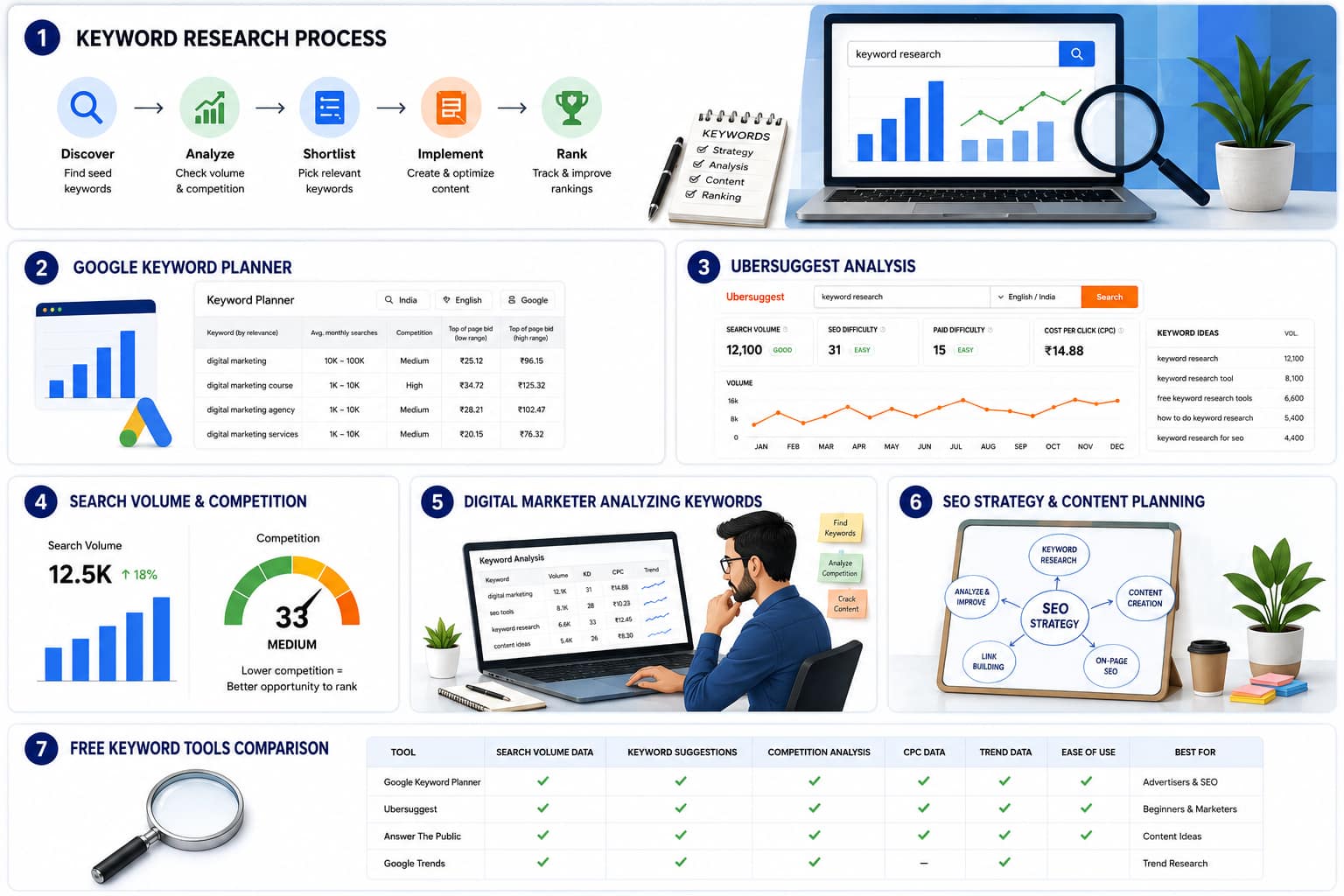
Keyword research is the starting point of every successful SEO strategy. In my experience in digital marketing, I have seen one common mistake again and again: people start writing content before understanding what their audience is actually searching for.
That approach usually leads to content that looks good on paper but does not bring traffic, leads, or conversions. Good keyword research solves that problem. It helps you discover what people want, how they search, and what language they use. Once you understand that, you can create content that feels useful, ranks better, and connects with the right audience.
For a blog like keyword research is especially important because it helps build topical authority. If the goal is to educate readers, attract organic traffic, and position the website as a trusted marketing resource, then every article should be built on search demand, search intent, and user value.
What Keyword Research Really Means
Keyword research is not just finding words with high search volume. It is the process of understanding the exact terms, questions, and phrases people use when they search online.For example, a business owner may think people search for “digital marketing services,” but keyword research might reveal stronger queries such as:digital marketing agency near mePPC services for small businessSEO for local businesslead generation servicessocial media marketing companyThis difference matters because search engines do not rank content based only on topic. They rank content based on relevance to user intent. If your content matches the real language of your audience, you have a far better chance of getting clicks and engagement.
Keyword research is not just finding words with high search volume. It is the process of understanding the exact terms, questions, and phrases people use when they search online.For example, a business owner may think people search for “digital marketing services,” but keyword research might reveal stronger queries such as:digital marketing agency near mePPC services for small businessSEO for local businesslead generation servicessocial media marketing companyThis difference matters because search engines do not rank content based only on topic. They rank content based on relevance to user intent. If your content matches the real language of your audience, you have a far better chance of getting clicks and engagement.
Why This Matters
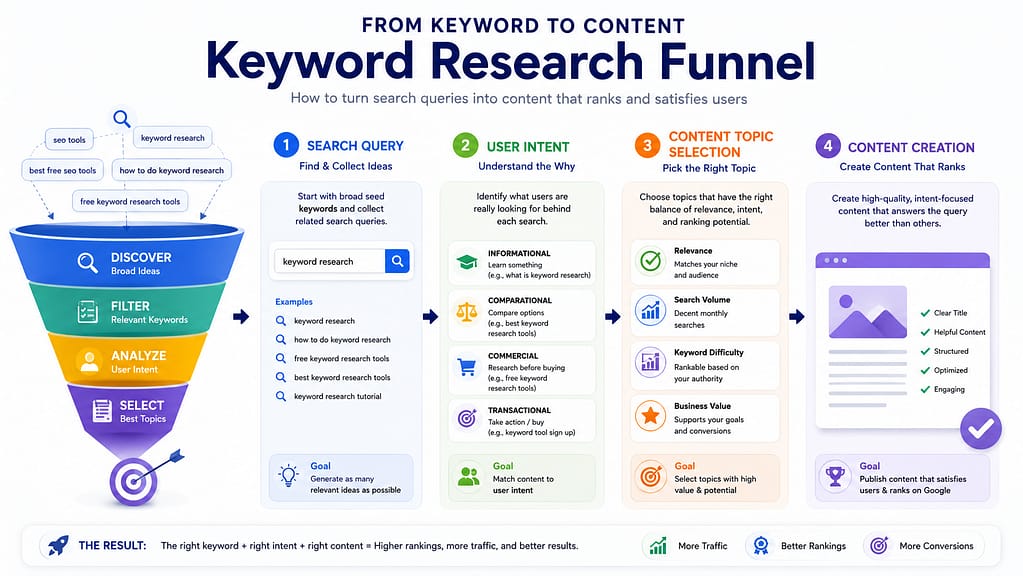
You should use keyword research because it helps you:
- understand customer demand
- create content that answers real questions
- reduce guesswork
- improve rankings with better topic targeting
- support both SEO and paid campaigns
- find long-tail opportunities that are easier to rank for
How to Use It
Before writing any blog post, landing page, or service page:
- decide the main topic
- search related keyword variations
- check what users are actually asking
- match your content to the intent
- use those terms naturally in headings and body text
Why Free Keyword Research Tools Are Enough for Many Websites
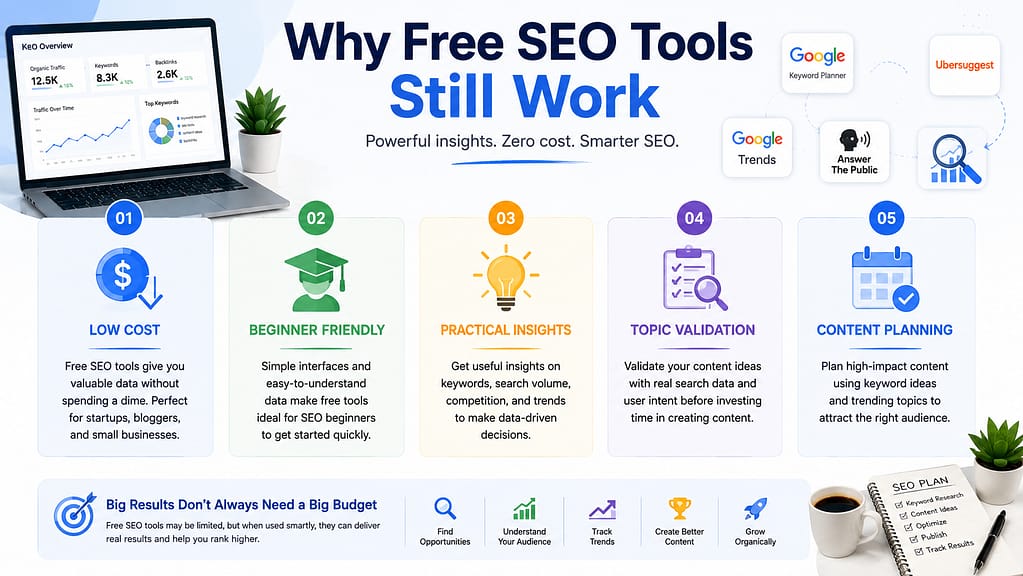
Many beginners believe they need expensive SEO software from day one. That is not true. Free tools are often enough to build a strong keyword strategy, especially for new websites, blogs, freelancers, and small businesses.
Free keyword tools are useful because they help you:
- identify content ideas
- validate a topic before writing
- understand search behavior
- discover question-based keywords
- build an SEO content calendar
In practice, I often use a mix of free and paid tools. But for many websites, free tools already provide 70–80% of the insights needed to create strong content. The real skill is not the tool itself. The real skill is knowing how to interpret the data.
Why You Should Use Free Tools First
You should start with free tools when:
- your website is new
- your SEO budget is limited
- you want quick topic validation
- you are building a content plan
- you need ideas for blog posts
- you want to test the market before investing in premium tools
How to Use Them Effectively
Do not use one tool in isolation. Compare data across multiple tools:
- use Google Keyword Planner for volume ideas
- use Search Console for existing performance
- use autocomplete for intent clues
- use question tools for blog ideas
- use competitor pages for topic gaps
Best Free Keyword Research Tools You Can Use
1. Google Keyword Planner
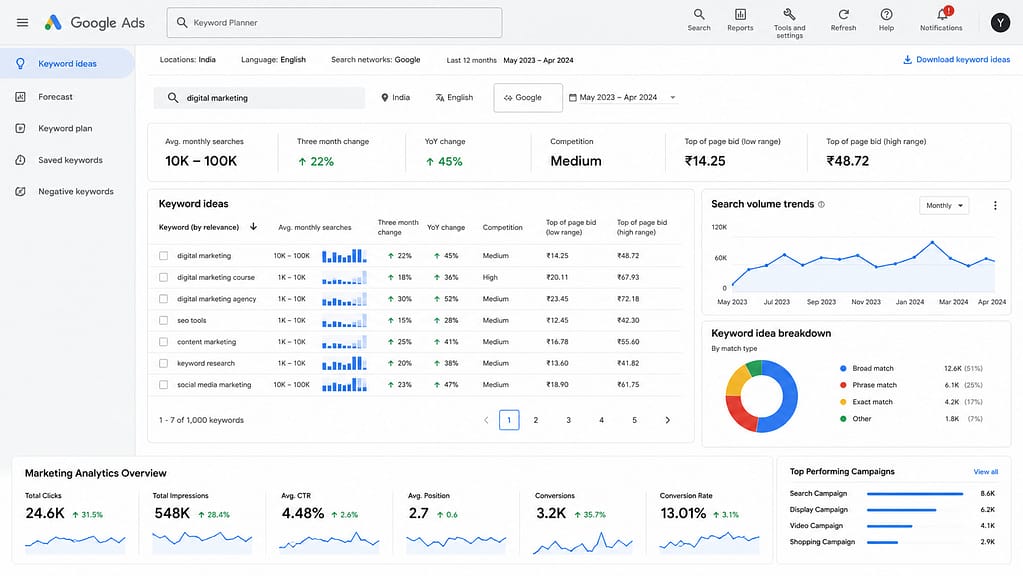
Google Keyword Planner is one of the most trusted free keyword research tools because it comes directly from Google. It is especially useful for understanding keyword ideas, search volume ranges, and ad competition.
Why Use It
Use Google Keyword Planner because it helps you identify terms people are actively searching for. It is useful for both SEO and PPC.
How to Use It
- enter your main topic
- review keyword suggestions
- check search volume ranges
- note related terms
- group the keywords by intent
Example
If you enter “content marketing,” the tool may suggest:
- content marketing strategy
- content marketing agency
- content marketing tools
- content marketing examples
- content marketing for small business
These suggestions help you build blog ideas, landing pages, and service pages.
2. Google Search Console
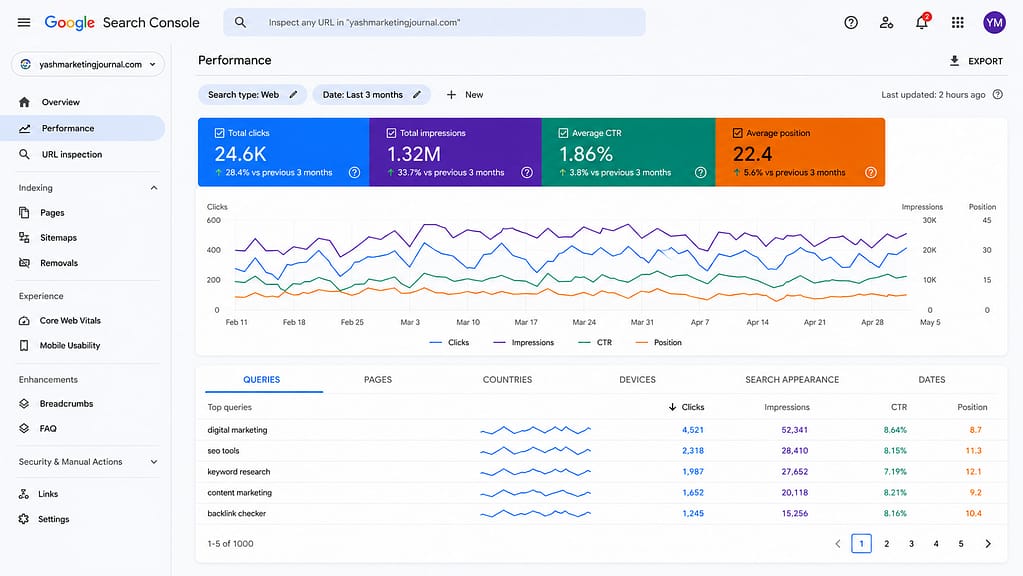
Google Search Console is one of the most powerful free SEO tools because it shows how your own website performs in Google Search.
Why Use It
You should use Search Console because it tells you:
- which keywords already bring impressions
- which pages get clicks
- which queries need better optimization
- where you are ranking on page 2 or page 3
How to Use It
- open the performance report
- check queries with high impressions
- find pages with low CTR
- improve titles and meta descriptions
- expand content around terms already ranking
Practical Example
If a blog is getting impressions for “free keyword research tools for bloggers” but not enough clicks, you can improve the title, add stronger intent matching, and expand the article around that topic.
3. Google Autocomplete
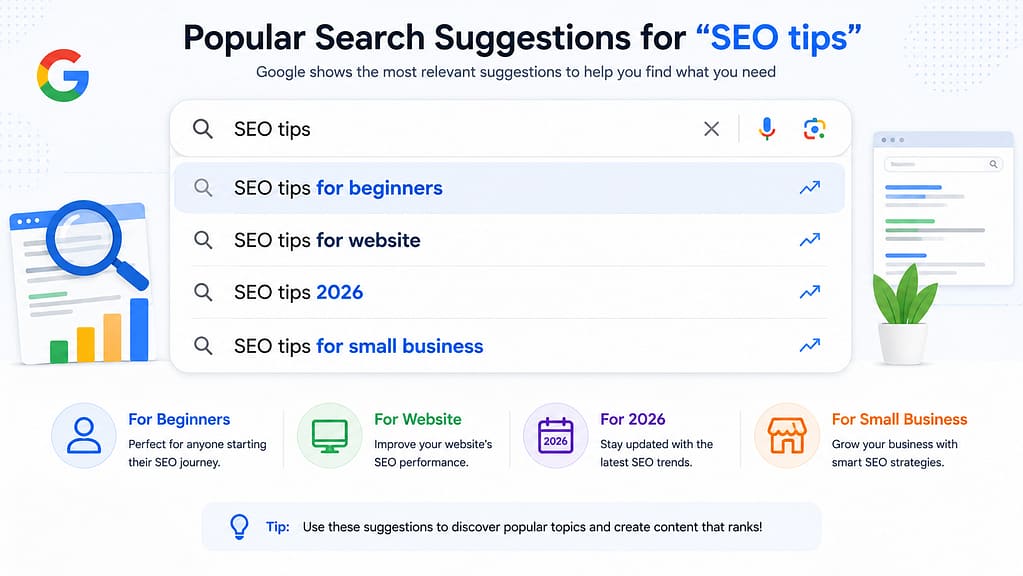
Google Autocomplete is simple, fast, and very effective. As you type a query into Google, it suggests common searches based on real user behavior.
Why Use It
You should use it because autocomplete reveals:
- what people are actually searching
- popular long-tail keywords
- question-based terms
- trending variations
How to Use It
- type a topic into Google
- note the suggestions
- try different starting words
- look for intent patterns
- collect ideas for blog headings
Example
If you type “SEO tips,” you may see suggestions like:
- SEO tips for beginners
- SEO tips for website
- SEO tips 2026
- SEO tips for small business
These are easy blog ideas with clear user intent.
4. Ahrefs Free Keyword Generator
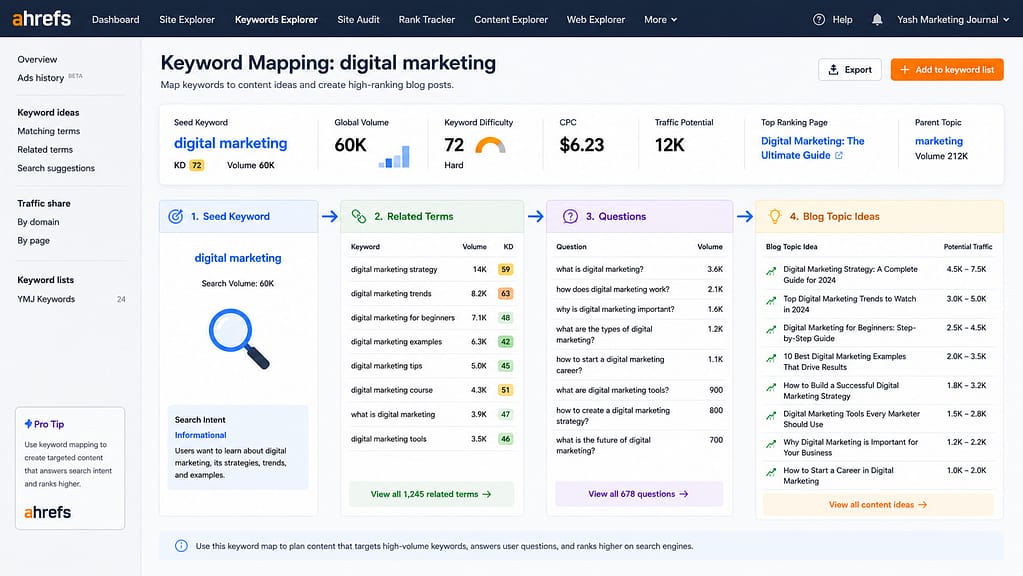
Ahrefs provides a free keyword generator that can be useful for quick research.
Why Use It
It helps you discover:
- related keyword ideas
- question-based topics
- search volume data
- keyword difficulty indicators
How to Use It
- enter your seed keyword
- review related queries
- find informational and commercial keywords
- choose low-competition opportunities
Example
For “digital marketing,” you may find:
- digital marketing strategy
- digital marketing trends
- digital marketing for beginners
- digital marketing examples
5. AnswerThePublic
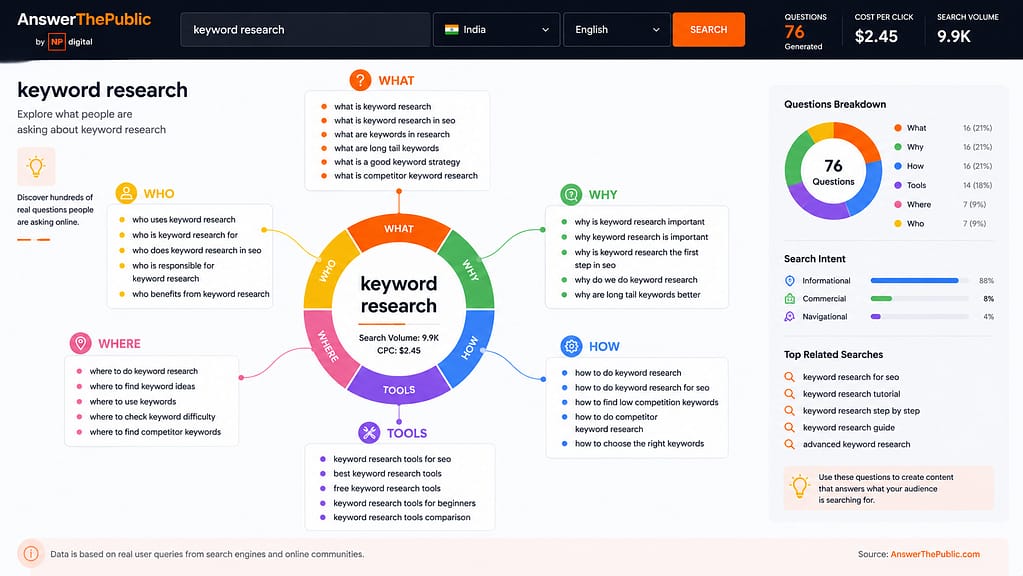
AnswerThePublic is excellent for understanding what questions people ask around a topic.
Why Use It
You should use it because question keywords often match informational search intent. These are ideal for blogs, FAQs, and educational articles.
How to Use It
- enter your core keyword
- review questions, comparisons, and prepositions
- turn those queries into headings
- answer them clearly in your article
Example
If your keyword is “keyword research,” you may find:
- what is keyword research
- why is keyword research important
- how to do keyword research
- keyword research tools for SEO
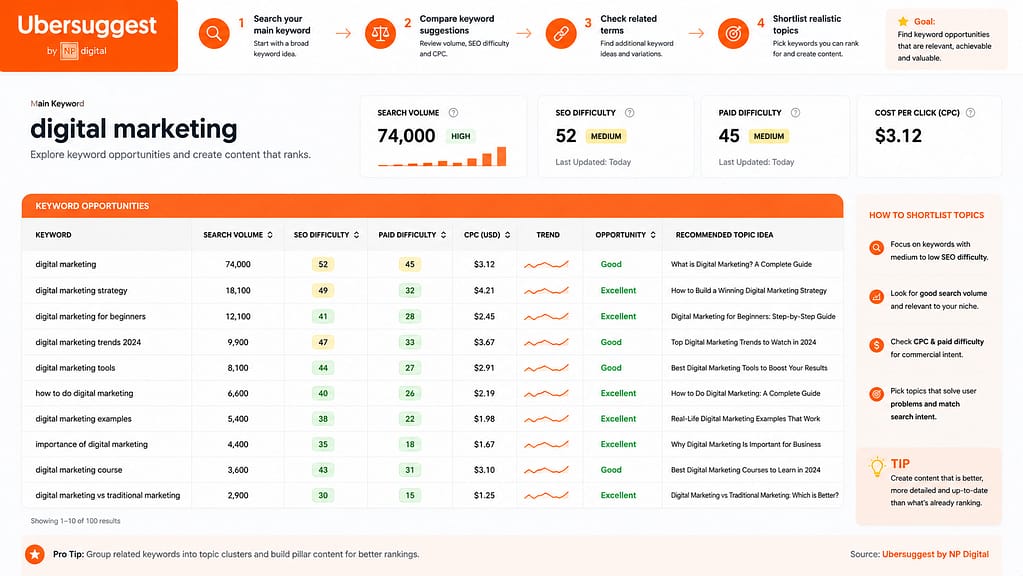
6. Ubersuggest
Ubersuggest is useful for quick keyword discovery and topic planning.
Why Use It
It is beginner friendly and gives a simple view of:
- keyword ideas
- traffic potential
- SEO difficulty
- content opportunities
How to Use It
- search your main keyword
- compare keyword suggestions
- check related terms
- shortlist realistic topics
7. Bing Webmaster Tools
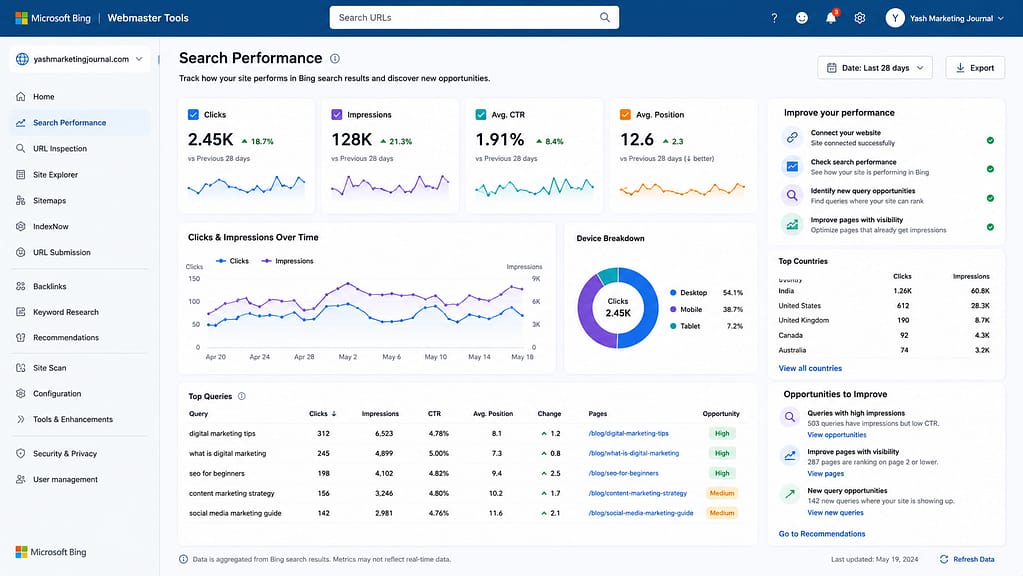
Bing Webmaster Tools is often ignored, but it can still provide keyword insights and performance data.
Why Use It
It is useful if you want to:
- understand search visibility beyond Google
- review keyword opportunities
- support multi-search-engine optimization
- track performance on Bing and AI-driven search experiences
How to Use It
- connect your website
- check search performance
- identify new query opportunities
- improve pages that already have visibility
How to Choose the Right Keyword
Not every keyword deserves a blog post. A smart digital marketer chooses keywords based on search intent, competition, and business value.
Why You Should Be Selective
If you chase only high-volume keywords, you may spend months trying to rank without results. If you choose practical keywords with clear intent, you can generate traffic faster and more consistently.
How to Choose Better Keywords
Ask these questions:
Does this keyword match my audience?
Is the search intent informational, commercial, or transactional?
Can I create better content than what already exists?
Does the keyword support my business or blog goal?
Is there a realistic chance to rank?
Example
Instead of targeting:
SEO
Try:
SEO tips for small business
free SEO checklist for beginners
keyword research tools for bloggers
how to do keyword research for blogs
My Keyword Research Process as a Digital Marketer
With my experience, my keyword research process usually looks like this:
Step 1: Define the goal
Do I want traffic, leads, brand visibility, or conversions?
Step 2: Choose the topic
What subject is most relevant to the audience?
Step 3: Find keyword variations
Use free tools and autocomplete.
Step 4: Check intent
Understand whether the user wants information, comparison, or action.
Step 5: Analyze competition
See what kind of content is already ranking.
Step 6: Build content structure
Turn the keyword into headings, FAQs, and internal links.
Step 7: Optimize and publish
Use the keyword naturally across the page.
Why This Works
This process works because it combines search data with human judgment. Tools can show you patterns, but experience helps you pick the right opportunity.
Common Keyword Research Mistakes to Avoid
Many blogs fail not because the writer is weak, but because the keyword strategy is poor.
Mistake 1: Targeting broad keywords only
Broad keywords are usually too competitive.
Mistake 2: Ignoring search intent
If the searcher wants information and your page is trying to sell, the content may not perform well.
Mistake 3: Using keywords unnaturally
Stuffing keywords hurts readability and SEO quality.
Mistake 4: Not checking existing rankings
You may already have a page that can be improved instead of creating a new one.
Mistake 5: Skipping FAQs and related terms
FAQs help you cover more search queries and improve topical depth.
Conclusion
Keyword research is not just a technical SEO task. It is a business decision. The right keywords help you attract the right visitors, create useful content, and grow organic visibility over time.
After working in digital marketing for more than 7 years, I can confidently say that the best keyword research is not about chasing the biggest number. It is about understanding people. Once you know what they want and how they search, you can build content that actually performs.
Free keyword research tools are powerful enough to help you begin. Use them wisely, combine them with experience, and always write for the reader first.
Frequently Asked Questions
FAQ 1: What is the best free keyword research tool?
The best tool depends on your goal, but Google Keyword Planner, Google Search Console, and Google Autocomplete are among the most useful free options.
FAQ 2: Can I do keyword research without paid tools?
Yes. Free tools are enough for most beginners, bloggers, and small businesses to create strong SEO content.
FAQ 3: Why is keyword research important for SEO?
It helps you understand what users are searching for and allows you to create content that matches their intent.
FAQ 4: How often should I do keyword research?
You should review keywords before creating new content and revisit performance regularly using Google Search Console.
FAQ 5: What are long-tail keywords?
Long-tail keywords are longer, more specific search phrases that usually have lower competition and clearer intent.
FAQ 6: How do I choose the right keyword for my blog?
Choose a keyword that is relevant, searchable, realistic to rank for, and aligned with your content goal.
FAQ 7: Do trending keywords matter?
Yes, but they should be used carefully. Combine trending keywords with evergreen topics to keep your content useful for longer.